Screen time for Windows 10 & 11
Healthy screen time for the whole family.
Timerz limits time on the family PC – fair, flexible and without your data ever leaving the house. You set the rules, the rest runs on its own.
All in one place
Limit time meaningfully – not just forbid it.
From fair daily limits to rewards for learning and chores. Timerz adapts to your family's day instead of dictating it.
Fair limits
Rules that fit every child.
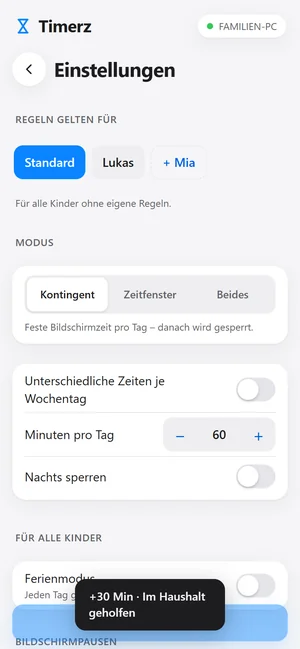
A daily allowance, fixed hours or both – separate rules for every Windows account. When the time is up, the screen locks gently; the next day it continues automatically.
- Minutes per day or per weekday
- Allowed time windows & bedtime
- Limit individual games & websites
Parent app for your phone
Everything in view – even on the go.
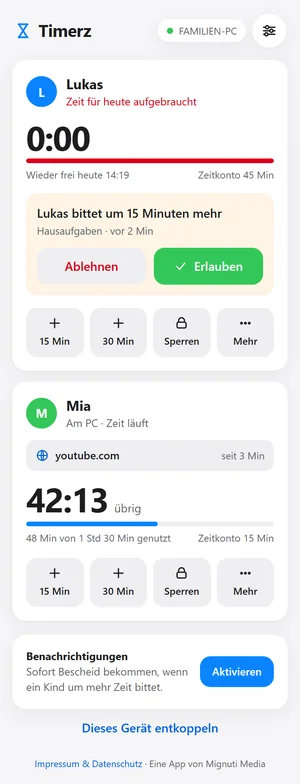
Your child asks for more time? You get a message on your phone and decide with one tap. Lock, grant bonus time or watch the remaining time live – from anywhere, end-to-end encrypted.
- Answer requests via push
- Lock or unlock instantly
- Pairing via QR code – no account
Reports & history
Understand, not just control.
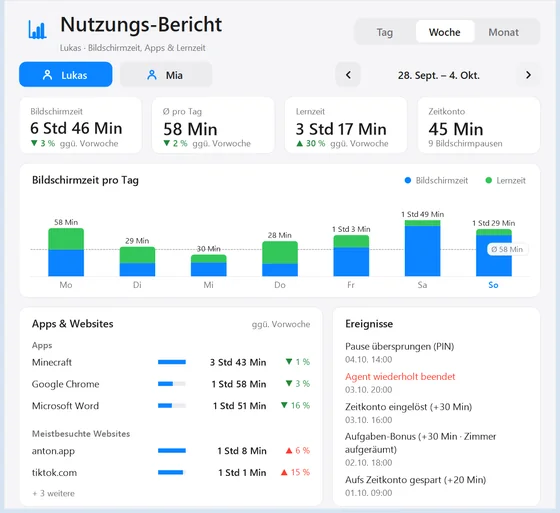
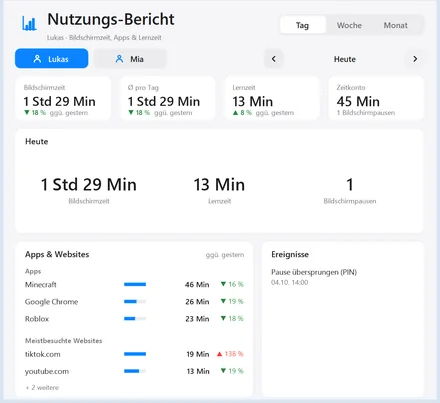
Day, week or month at a glance: how much time, which apps, which websites – compared to the previous period. Save as a PDF and review at your leisure.
- Trends per app and website
- Study time shown separately
- Export as PDF
Screen breaks
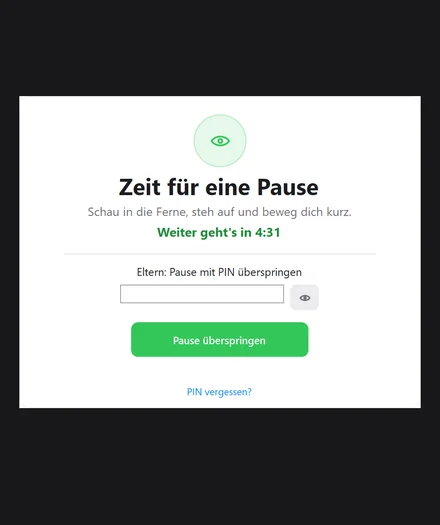
After an adjustable stretch, a short break for eyes and movement – good for focus and posture.
Time bank & bonus
Carry unused minutes over to the weekend, or grant bonus time for finished chores – motivating instead of forbidding.
Study & focus time
For homework only an allow list counts – learning apps run, everything else pauses. Learning doesn't count towards the allowance.
Ready in minutes
How it works.
Install
Run the Timerz setup on the family PC. The service then runs in the background and can't be stopped by your child.
Rules & PIN
Set a parent PIN and the times for each child. Done – Timerz takes care of the rest automatically.
Pair your phone (optional)
Scan the QR code and add the parent app to your phone. From now on you answer requests on the go too.
Privacy first
Your data stays home.
Timerz runs without an account and without a cloud. Usage times and settings stay on your PC. Only when you pair the parent app are requests transferred – end-to-end encrypted, so no one else can read along.
No accounts
No sign-up, no email, no profiles. You install – and it runs.
End-to-end
The key is only in the QR code. Neither we nor the host can read your content.
No ads
No trackers, no telemetry, no sharing with third parties. GDPR-compliant.
Fair & transparent
Start free. Premium without a subscription.
Start free with time limits and lockdown times. Unlock all pro features and the parent app for your phone with a single one-time purchase – no subscription, no hidden costs.
Timerz Free
€0 forever
The basics – free for good.
- Daily time limits & lockdown times
- For any number of children
- Runs completely offline
- Free updates
Timerz Premium
€14.99 one-time
€19.99 · Launch price
- Everything in Free
- Screen breaks for real rest
- Advanced reports: week, month & PDF
- Time bank: save & carry over time
- Study & focus time, tracked separately
- Parent app for your phone
Unlock Premium right inside the app – one-time, no subscription.
Questions & answers
Frequently asked questions.
Is any data sent to the internet?
Does Timerz work without the internet?
Can my child simply close or bypass Timerz?
Several children on one PC?
Which version of Windows do I need?
Do I absolutely need the phone app?
Ready to get started?
Get Timerz for your family PC.
Install, set the rules, done. Healthy screen time without daily arguments.
Windows 10 & 11 · 64-bit · approx. 119 MB